The trades page, rebuilt — what changed and why
This week we rebuilt the part of BroTrades you use most: the list of your trades and the journal behind each one. This post goes through each change, why we made it, and what we got wrong on the way.
Some of it is live now. The new two-column view and partial closes are rolling out this week. Each section says which is which.
At a glance
- Rolling out this week: your trades in a list on the left, the trade you pick on the right, with the journal next to its levels.
- Rolling out this week: open positions sit at the top of the list with live P&L, and their dates start at your first fill.
- Rolling out this week: a position you close in parts stays one journaled trade, and closes when the parts add up.
- Live: a take-profit that filled a little past its price is labelled TP, because the exchange says so.
- Live: a reworked calendar, auto-sync four times a day, and Ukrainian plurals that follow Ukrainian rules.
The screenshots below come from a test account with made-up trades.
🗂 A list on the left, the trade on the right
Rolling out this week.

The old dashboard showed your trades as a table with 13 columns. The journal, the six questions you answer about each trade, sat inside a row you had to expand. On a phone it was one long form with the questions at the bottom.
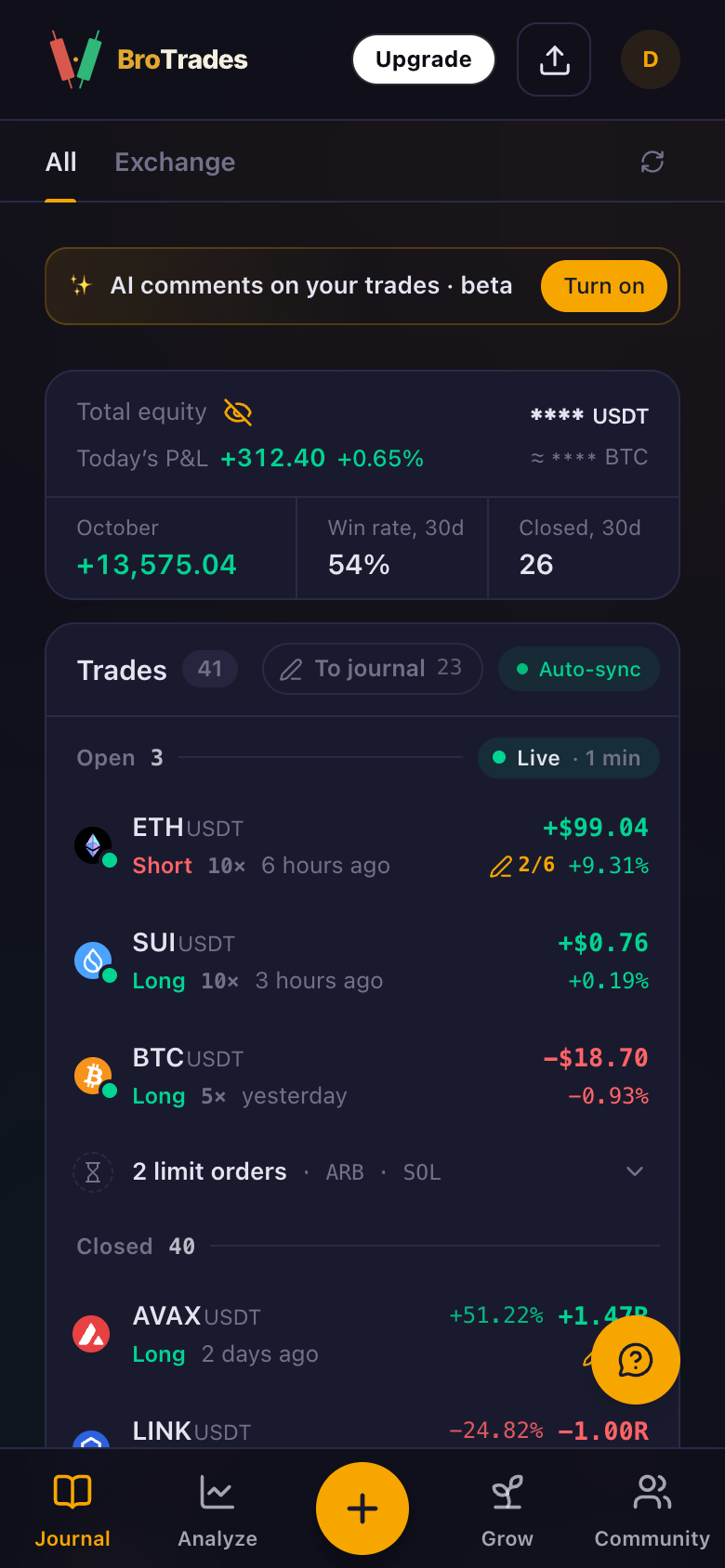
But the journal is the whole point. So now the list is a narrow column on the left: coin, side, result in R, how long ago, and how many of the six questions you have answered. The trade you pick fills the rest of the screen, and it has its own link, so you can send someone the exact trade you mean.
On the right:
- You can write at once. The first unanswered question is already a text box. Tap it and type; Save appears as soon as you do. After you save, the next question opens. With a keyboard, ⌘↵ saves and Esc cancels.
- The journal sits beside the levels. Entry, stop, target, exit, size and leverage are at the top, next to the journal, not under the chart. You see what you planned while you write about how it went.
- The close reason is a chip by the result: TP, SL, BE or Manual.
- "To journal" filters the list to trades you haven't written about yet.
- Arrows, j/k or ↑/↓ move to the next trade.
On a phone you get the list first, and a tap opens the trade full screen with Back and Newer / Older.
Why: you should be able to read a trade and write about it in one look. A table is good for scanning numbers. It is bad for thinking about one trade.
Charts fold away
Many of you chart on TradingView and don't need our chart in the journal. A chevron on the Charts row folds them. Folded, they don't load at all. The choice is saved on your device: phones start folded, larger screens start open.
A click no longer loads a page
Picking a trade used to load a new page. The server rebuilt the whole dashboard on every click, which took about 0.4 s to show the trade and about 1.5 s to show its charts. That is slow when you go through ten trades in a row.
Now the list already carries what each trade needs, so a click just swaps the right side. In our tests the trade shows in under 0.1 s and the charts in 0.1 to 0.3 s. Charts start loading when you rest the pointer on a row, and the next trade's charts load while you read the current one.
📌 Open positions at the top of the list
Rolling out this week.

There used to be a separate Active Positions block above your trades. It is gone. Open positions now sit at the top of the list under Open, with live P&L on each row, and limit orders fold into one line below them.
Pick an open position and the right side shows where it stands now: P&L, how far it has moved in R against your plan, mark price, break-even and liquidation, and the journal. If you haven't started journaling it, one tap starts.
The balance card moved into the list column as well: total equity (hidden behind the eye if you like), today's P&L, this month, your 30-day win rate and how many trades you closed in 30 days.
The live refresh got much lighter. The old block refreshed by redrawing the whole dashboard once a minute, about 25 requests a minute from your browser. Now the page asks for your positions once a minute, and only while something is open, the tab is visible and you are online. One request a minute, and the page itself no longer reloads.
Dating an open position honestly
We found this one on a real open position. Bybit reports a "position created" time, and we used it as the day you opened the trade. That time turns out to be when Bybit first created the slot for that coin on your account, and it stays the same through every close and reopen. A position opened last week showed as opened last winter, with a chart from back then.
So now we read your fills and date a position from its first fill. An open trade has one chart, "Since entry", with a mark at every fill: B for a buy, S for a sell. On a long, every add is a B and every partial close an S. The size and entry shown are the live ones, not what they were on the day you started the journal.
✂️ Partial closes add up to one trade
Rolling out this week.
Say you journal a long while it is open, take half off at the first target, and close the rest the next day. The exchange reports that as two closing orders, each with its own P&L.
Our sync used to close your journaled trade on the first of them. The trade ended with only half the P&L while the position was still open, and the second half came in as a separate trade with none of your notes.
Now each partial close is recorded on the journaled trade. The trade stays open until the closed parts add up to the size you journaled. Then it closes once, with the total P&L, the total size, and the average entry and exit. Until then its P&L stays at zero, so each part counts exactly once in your stats, the calendar and your profile. If the exchange shows the position is gone but a part is missing, the trade closes anyway, so it can't stay open forever.
This is for positions you journal while they are open. Positions you never journaled, manual trades and statement uploads work as before.
🎯 TP and SL labels come from the exchange
Live.
Every closed trade gets a label: TP, SL, BE or Manual. Until now we guessed it from the price. If the exit was within 0.2% of your target, we called it TP.
But a take-profit usually fires a market order when price touches your target, and that order can fill a little past it. One short closed by its own take-profit filled 0.33% past the target, and we labelled it Manual.
The exchange already tells us which order closed a position. Now, when Bybit says the closing order was your take-profit or your stop-loss, that is the label. A stop that closed in profit, because you had moved it past entry, reads BE. The 0.2% rule is only a fallback for when the exchange doesn't say. The sync relabels Bybit trades from the last seven days; older trades keep their label for now. Binance runs the same check on the orders we already fetch, but we haven't seen it on real Binance data yet.
📅 A calendar you can read at a glance
Live.

We rebuilt the calendar's month, week and year views and gave it a proper phone layout.
- Big numbers are short. From 10,000 up, amounts print as +17.5k or +1.2M, so they fit in a day.
- Days follow Kyiv time. A trade closed just after midnight used to land on the wrong day, and tapping the day didn't show it. Now the day and its list of trades agree.
- Empty months point somewhere. A month with no trades names the nearest days that have some.
- No more mixed currencies (rolling out with the two-column view). If a period has trades in both EUR and USD, we no longer add them together. Net P&L shows "—" with the note "Mixed currencies".
👥 Your public profile, same layout
Rolling out this week.
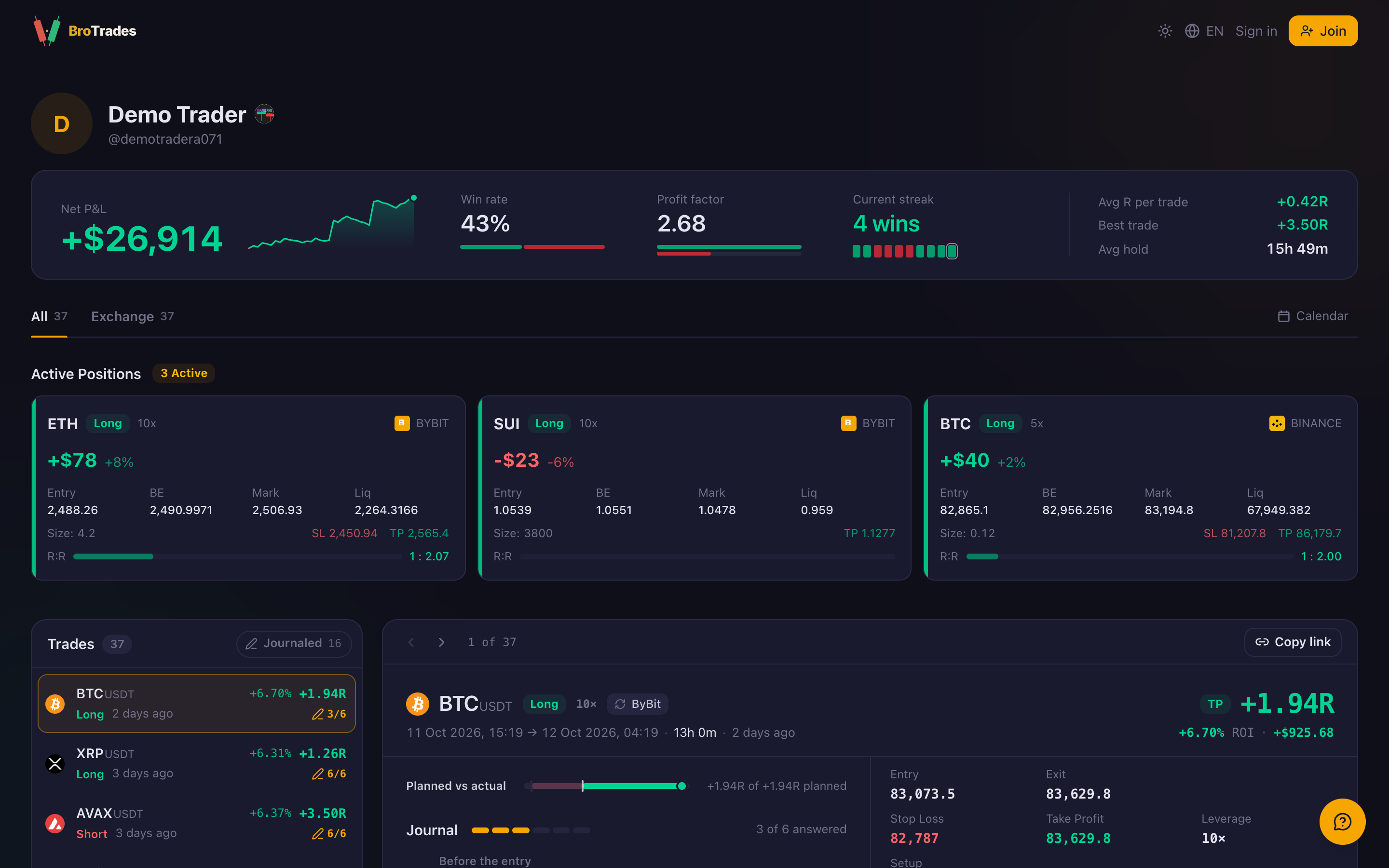
Your public profile now uses the same list and trade view, read-only. Visitors can read your journal answers if you share them, and they can still leave comments.
The results card at the top lost its grey small print. Each figure is a label and a value: net P&L, win rate, profit factor, current streak, average R, best trade, average hold. Where a small picture says more than a sentence, there is one: an equity curve beside net P&L, a bar under win rate. Dollars are whole. The detail is still there if you hover a figure on a computer.
Why: we kept adding one more number. Each extra line made the ones that matter harder to find.
🔄 Two smaller fixes
Live.
- Auto-sync four times a day. Your exchange trades now sync at 01:00, 10:00, 15:00 and 19:00 Kyiv time instead of once a day. The sync button on the dashboard still works any time.
- Ukrainian plurals. Our Ukrainian pages use the code
ua. That is Ukraine's country code, not the language code (uk). The formatting library didn't recognise it and fell back to English rules, so the app wrote "5 угоди" where Ukrainian says "5 угод". It now follows Ukrainian rules everywhere, and numbers and dates use Ukrainian formats too.
💡 What we learned
- Trust the exchange's own record over a guess. We labelled closes by price because it was simple. The exchange already knew which order closed the trade. When the answer is in the data you already have, read it.
- A date from the exchange can mean something else. "Position created" sounded like the day you opened the trade. It was the day the slot was created, months earlier. Check what a field means on a real account before you build on it.
- One closing order is not one trade. Exchanges report a close piece by piece. A journal has to put the pieces back together.
- A page load per click is too slow for a journal. You go through trades one after another. Cutting a click from 0.4 s to under 0.1 s changed how the page feels more than any new layout did.
- Fewer numbers beat more. Each grey line looked useful on its own. Together they buried the figures that matter.
How to try it
- Open your dashboard.
- Pick a trade and answer the first question while you remember it.
- Use To journal to find the trades you haven't written about yet.
A journal you fill in on the day is worth more than a perfect one you meant to write.