Post your setups — the trade ideas feed is live
BroTrades now has a feed. Open Feed, post a setup — direction, symbol, entry, stop, target — and the R:R appears while you type.
At a glance
- Post an idea with text, with levels, or both.
- Levels alone are enough: fill direction, symbol and entry and the text is optional.
- R:R updates on every keystroke, and a stop on the wrong side of entry is flagged inline. Neither ever blocks the post.
- Attach a TradingView snapshot link or upload — or paste — a screenshot. Click the image to zoom.
- Views, likes and comments on every card. Views are unique per account.
- Every idea gets its own link. In Telegram or X the preview shows your chart, not a blank card.
- Follow the traders you rate; "Who to follow" suggests a few.
- Auto-posting your own trades exists — and it is off until you switch it on.
📈 A setup, not just a screenshot
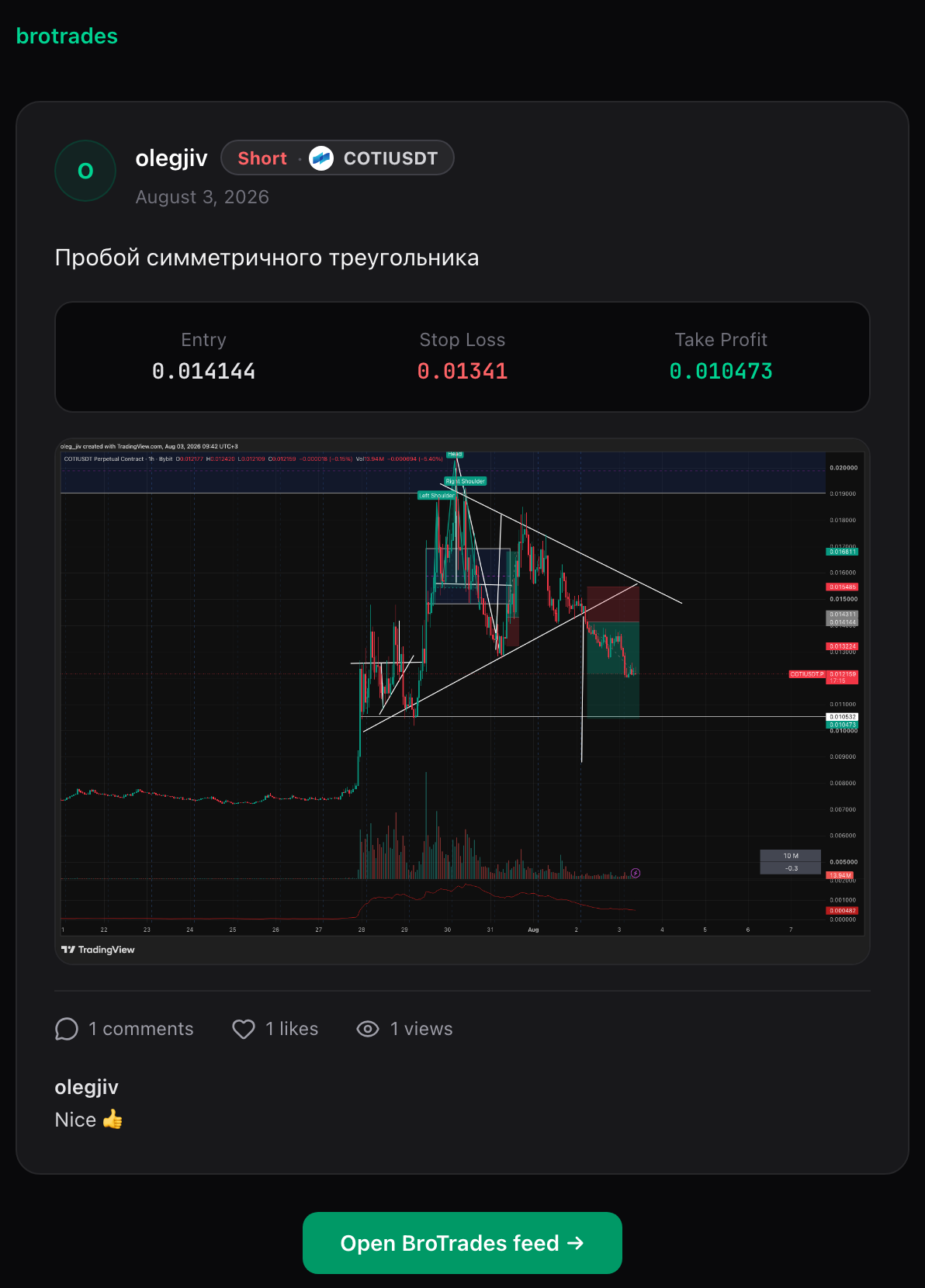
Type the idea, or skip the writing and give the numbers: direction, symbol, entry, stop, target. Fill direction, symbol and entry and you can post with no text at all — the card carries the levels and the R:R.
Why it matters: a chart with an arrow on it tells nobody where you got out. Levels are the part other traders can actually check you on, and the part you can check yourself on later.
🧮 It reads your levels while you type
Fill in direction, entry, stop and target and the R:R shows up at once, recalculating on every keystroke — no submit, no waiting. Put the stop above entry on a long and the composer says so: "Stop is above entry. For a long it belongs below entry."
It is a warning, never a wall. Post it anyway if you meant it. The only thing the composer refuses is a post with neither text nor a usable set of levels.
🖼 Charts, the way you already share them
Attach a TradingView snapshot link, upload a screenshot, or paste one straight from your clipboard into the box. One image per idea. Click it in the feed and it opens full size; Escape closes it.
👀 Views, likes, comments — and a timeline that stays put
Every card counts unique views — one per account, and yours counts as one from the moment you post, so a fresh idea reads "1 view" rather than nothing. Likes and comments sit in the same bar.
Posts that land while you are reading do not shove the timeline down. They stack behind a Show N posts bar at the top, and appear when you ask for them.
🔗 One link, and the chart travels with it
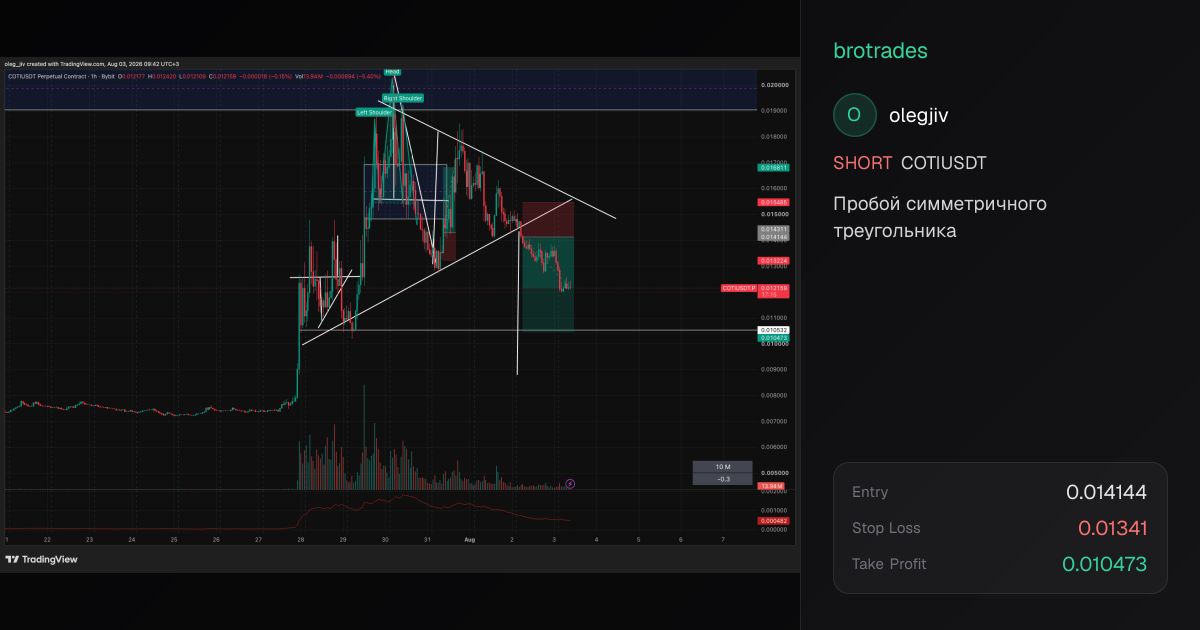
Every idea has its own page. Copy the link from the card, or use your phone's share sheet where the browser offers one. Drop that link in Telegram, X or a chat and the preview now renders the chart from the post — your levels and your screenshot, not a generic card.
Symbols carry their coin icon in the feed, with a lettered badge for anything we have no artwork for. No broken images, no ragged gaps.
🤖 Auto-posting: off until you turn it on
The feed can publish your trades for you. It does nothing until you open Feed settings and say so. Four switches, all off by default:
- Post my trades to the feed — one card per trade: synced, imported and hand-journaled alike.
- Show position size — off by default, and a card already shared elsewhere cannot be un-shared later.
- Delay posts by 15 minutes — a trade becomes eligible a quarter of an hour after it opens.
- Post the result when a trade closes — adds the realised R to the original card.
Leave them alone and nothing of yours is ever published automatically.
🚧 Copy trade is coming — and it will never touch your exchange
Cards with levels show a Copy trade button. Today it opens a note saying the feature is on the way: it will copy an idea's levels into your own journal as a trade you can edit before saving. It will not send an order to a broker or an exchange, now or later.
⏱ Also today: timeframes on your trade charts
Separate from the feed, and worth its own line: the chart on a trade now has a timeframe switcher — 1m, 5m, 15m, 1h, 4h, 1d. Pick one and the candles refetch for that interval. Trades priced from Yahoo data offer everything except 4h.
Summary
- 📈 Post the numbers — direction, symbol, entry, stop, target; text optional.
- 🧮 Live R:R — recalculated as you type, with an inline flag on a wrong-side stop that never blocks you.
- 👀 Views, likes, comments — unique views per account, and new posts wait behind a bar instead of jumping the timeline.
- 🔗 Shareable link — the preview carries your chart into Telegram and X.
- 🤖 Auto-posting is opt-in — four switches, all off until you turn them on.
- ⏱ 1m to 1d — timeframe switcher on every trade chart.
Got a setup you like? Open the feed and post it.