Open your journal and let people review your trades
Most trading journals are a diary. Yours can be a conversation.
Turn on a public profile and your journal gets its own address. Send it to a friend, a mentor, your trading group, and they can go through every closed trade you have made, see how each one ended, and leave a comment on the ones worth arguing about. They do not need an account to do any of it.
It takes about a minute to set up.
Turning it on
Two steps.
Pick a username. Open Settings, go to the Profile section, and set one. Your page lives at /u/ followed by that name. You can change it twice in fourteen days, and a released name is held for ninety days, so nobody can snipe yours.
Then, on the same page, find Dashboard Visibility and turn on Public Profile:

Nothing is published until that switch is on, and the page is live the moment it is.
What they get
This is a real public profile, opened by someone who is not signed in. Open it in another tab and you are seeing exactly what your reviewer would see:
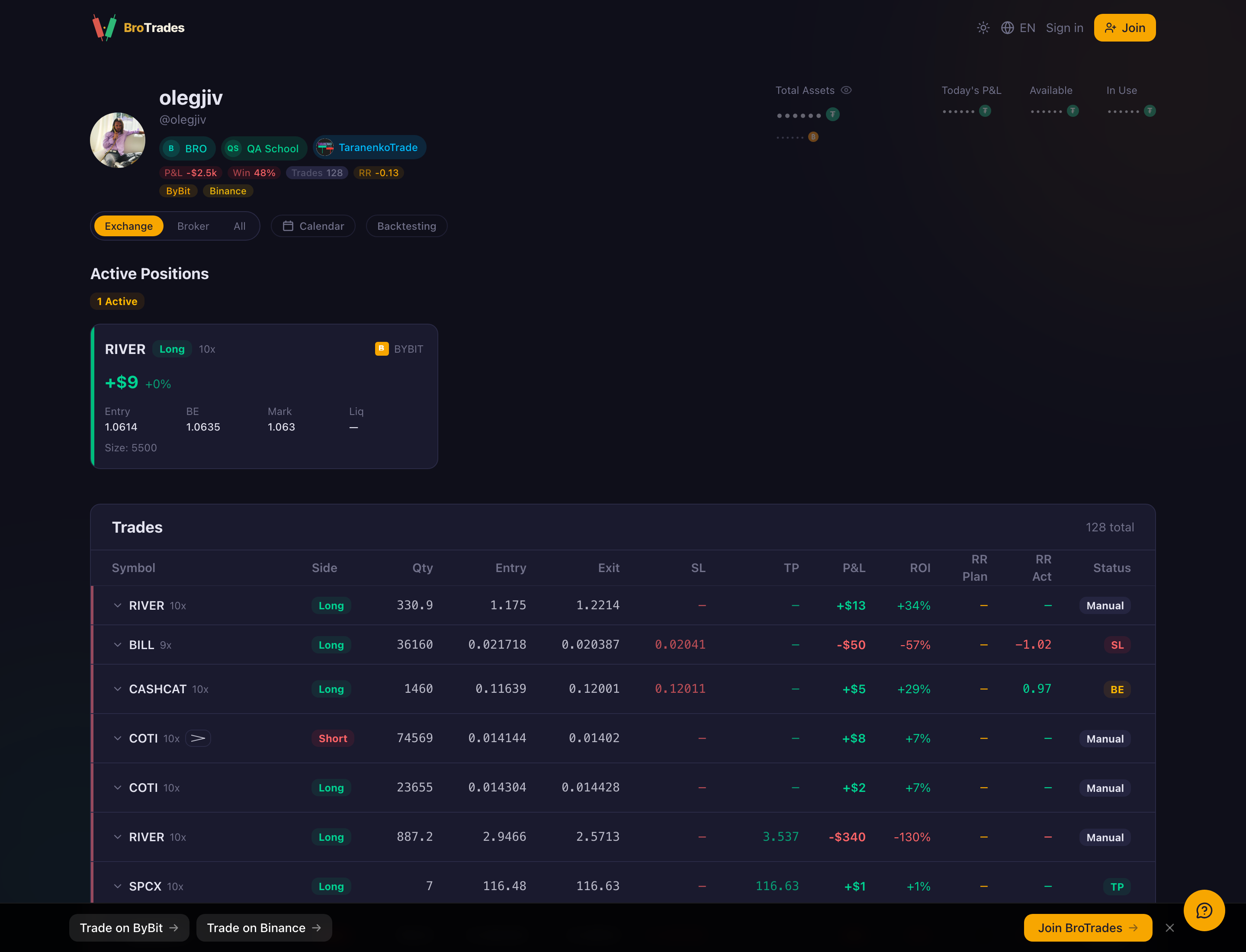
Everything a reviewer needs is on the page. Each row carries the entry and the exit, where the stop was, where the target was, what the trade made or lost, and how it ended: at the stop, at the target, at break-even, or closed by hand.
That last column is where the real conversation starts. A journal full of manual closes is a completely different problem from a journal full of stopped-out trades, and it takes someone else about ten seconds to notice which one you have.
There is a calendar too, at the same address with /calendar on the end:
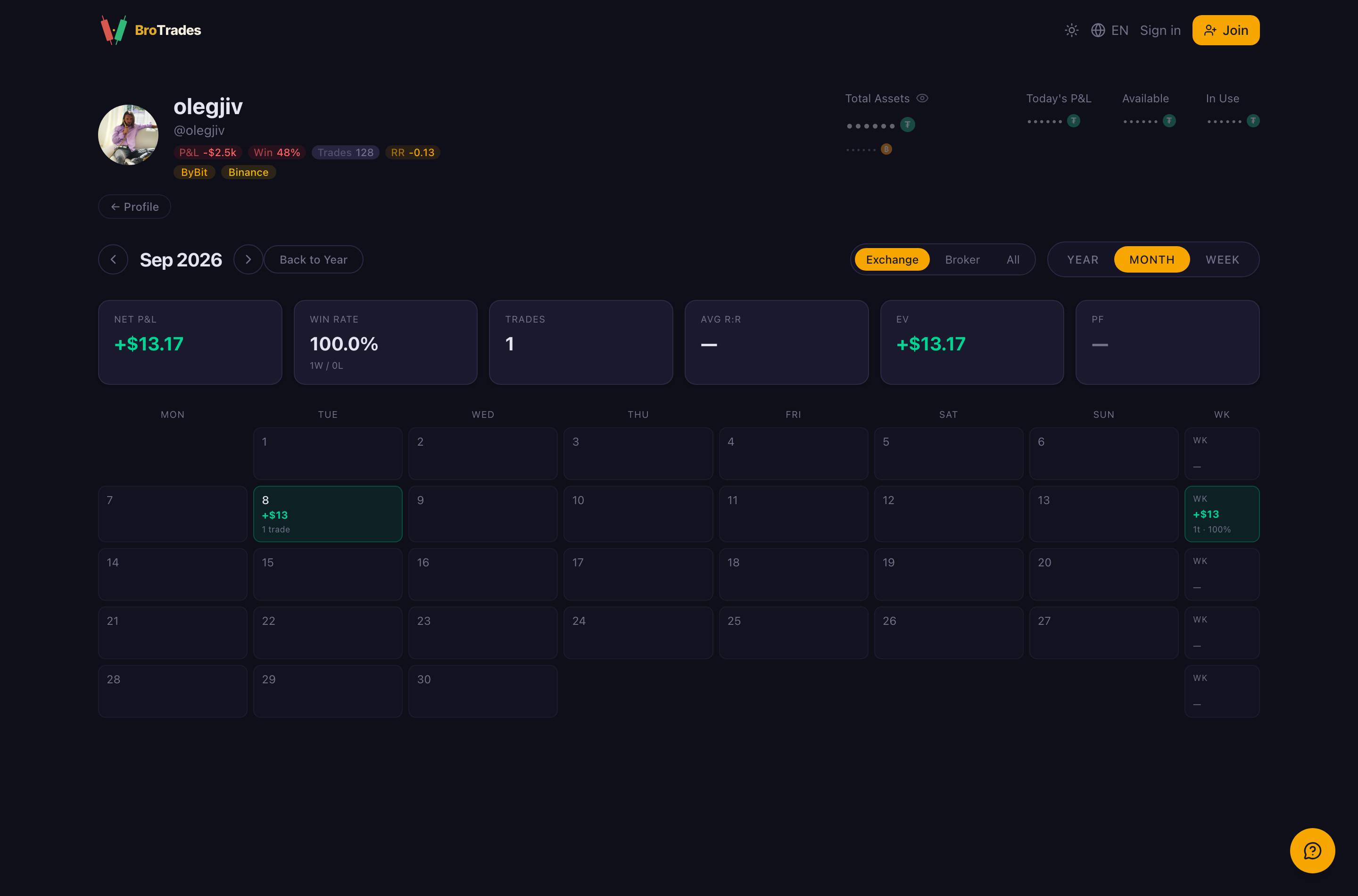
Win rate, expectancy and profit factor across the top, then every day of the month below. It answers "when do I actually trade badly" faster than any table can.
They can comment, without signing up
This is the part people do not expect. On the trades table, any visitor can open a trade and write a comment on it. No account, no sign-up, no email. They type a name and they type their thought.
That removes the one thing that usually kills this idea. You are not asking a friend to register for a product to do you a favour. You send a link, they read, they reply on the specific trade they have something to say about, and the comment stays attached to that trade in your journal.
Two practical notes. The comment thread lives on the full trades table, so ask your reviewer to open the link on a laptop rather than a phone. And where AI trade analysis has been approved on your account, those notes appear on the same rows, so a reviewer sees the machine's read and can disagree with it.
You decide how much shows
The same Settings section has a switch for each part of the journal:

The ones that change what a visitor sees are Monthly Stats, Trade History, Active Positions, Deposit, Monthly History, Latest Trades and Money Flow History.
Your wallet is never part of the deal. Look at the top right of the public profile further up: Total Assets, Available and In Use are dots, not numbers, for every visitor.
If you want a second opinion on your trading, Trade History is the switch that matters, and you can turn off everything else. If you would rather not show live positions while you are still in them, turn off Active Positions and publish only the closed history.
One thing those switches do not cover: the calendar is part of the profile rather than a widget, so it stays up as long as the profile does. Worth knowing if you were counting on hiding your day-by-day results.
One trade instead of the whole journal
Sometimes you only want an opinion on a single trade. Click any trade card in your Latest Trades list to open the sharing dialog, which turns that one trade into an image with a link you can paste into a chat. It shows that trade and nothing else.
Send it the way you would send a screenshot. The link points at an image file rather than a page that re-checks your settings, so treat it as out of your hands once it leaves.
Turning it off
The same switch in Settings. Flip Public Profile off and the page returns a not-found to everyone, including anyone who bookmarked it.
Until then it is a normal web page: anyone with the address can open it, whether or not you sent it to them personally. That is the trade you are making, and it is usually a good one. A journal you are willing to show someone is a journal you keep more honestly.