Backtest your strategy — import a TradingView report into your journal
BroTrades now reads TradingView Strategy Tester backtests. Run a strategy in the Replay / Strategy Tester, export the results as an .xlsx, and drop it onto the new Backtesting tab — the journal rebuilds the full performance report and keeps it completely separate from your live trades.
At a glance
- Upload a TradingView Strategy Tester
.xlsxon the new Backtesting tab. - Get the whole report: net profit, profit factor, Sharpe / Sortino, max drawdown, expected payoff.
- Equity curve, long-vs-short breakdown, every trade in a table, plus the Risk Manager and monthly / yearly stats.
- Every trade shows whether it exited at stop-loss or take-profit, and the price it fired at.
- Backtests never mix into your live numbers — they live on their own tab.
- Free plan: 5 backtests a month.
📊 The whole report, from one file
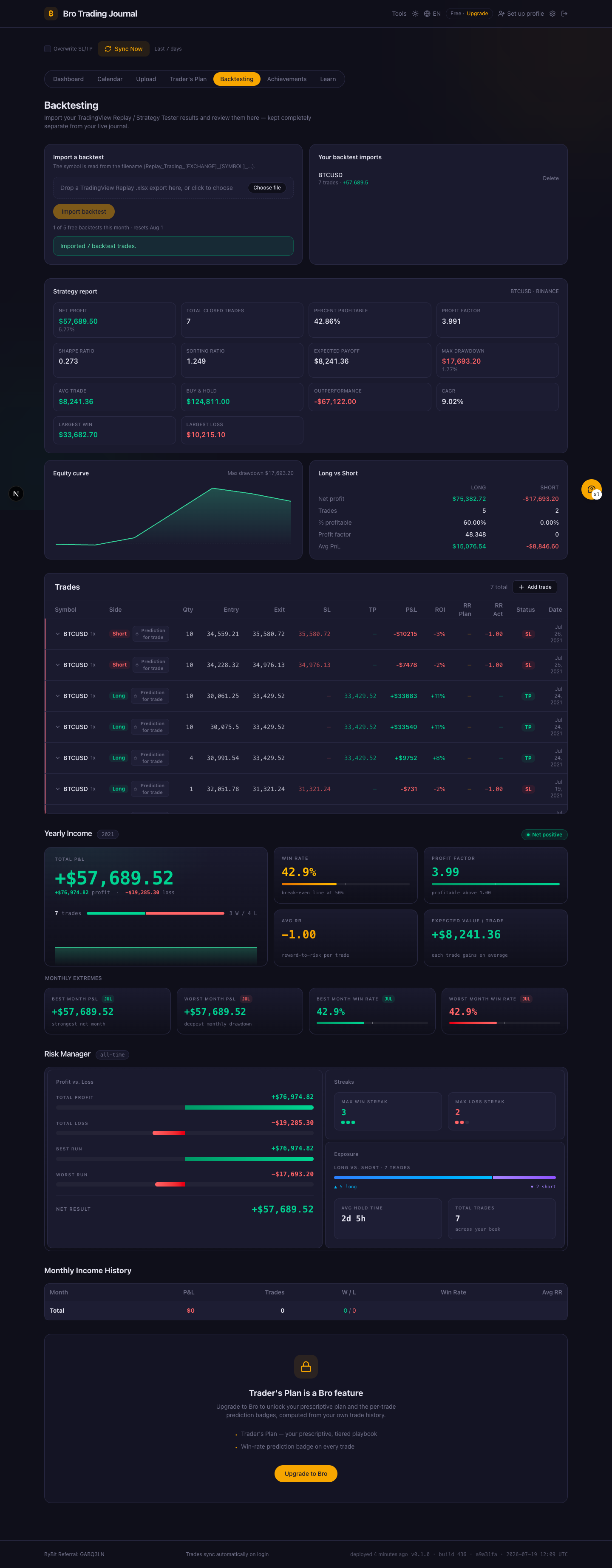
This is a real report from my own BTCUSD Replay run — 7 trades, rebuilt end to end from the exported file. Every widget you already use on your dashboard is here: the strategy report card up top (net profit, profit factor, Sharpe and Sortino, expected payoff, max drawdown), the equity curve, the long-vs-short split, and the full trade table with each entry and exit.
Why it matters: a backtest is only useful if you can actually read it. Instead of squinting at a spreadsheet, you get the same analysis surface you use for live trading — so a strategy's drawdown, win rate and profit factor are obvious at a glance.
🧪 Backtests stay separate from live
Everything you import as a backtest is tagged as one. It shows up on the Backtesting tab and nowhere else — your live dashboard, your stats and your public profile never count a single backtested trade. Test as many ideas as you want without touching your real track record.
Why it matters: the whole point of a journal is an honest record of what you actually traded. Backtests are experiments — they belong next to your live results, not mixed into them.
⬆️ How to import
Open the Backtesting tab, drag your TradingView Strategy Tester .xlsx onto the drop zone (the symbol is read straight from the file name), and the report builds itself. The free plan includes 5 backtests a month.
Summary
- 📊 One file, the whole report — upload a TradingView
.xlsxand get the equity curve, profit factor, drawdown, long / short and every trade. - 🧪 Separate from live — backtested trades never touch your real stats or public profile.
- ⬆️ Drag and drop — the Backtesting tab reads the symbol from the file name; 5 free backtests a month.
Ready to stress-test a strategy? Open the Backtesting tab and drop in your export.